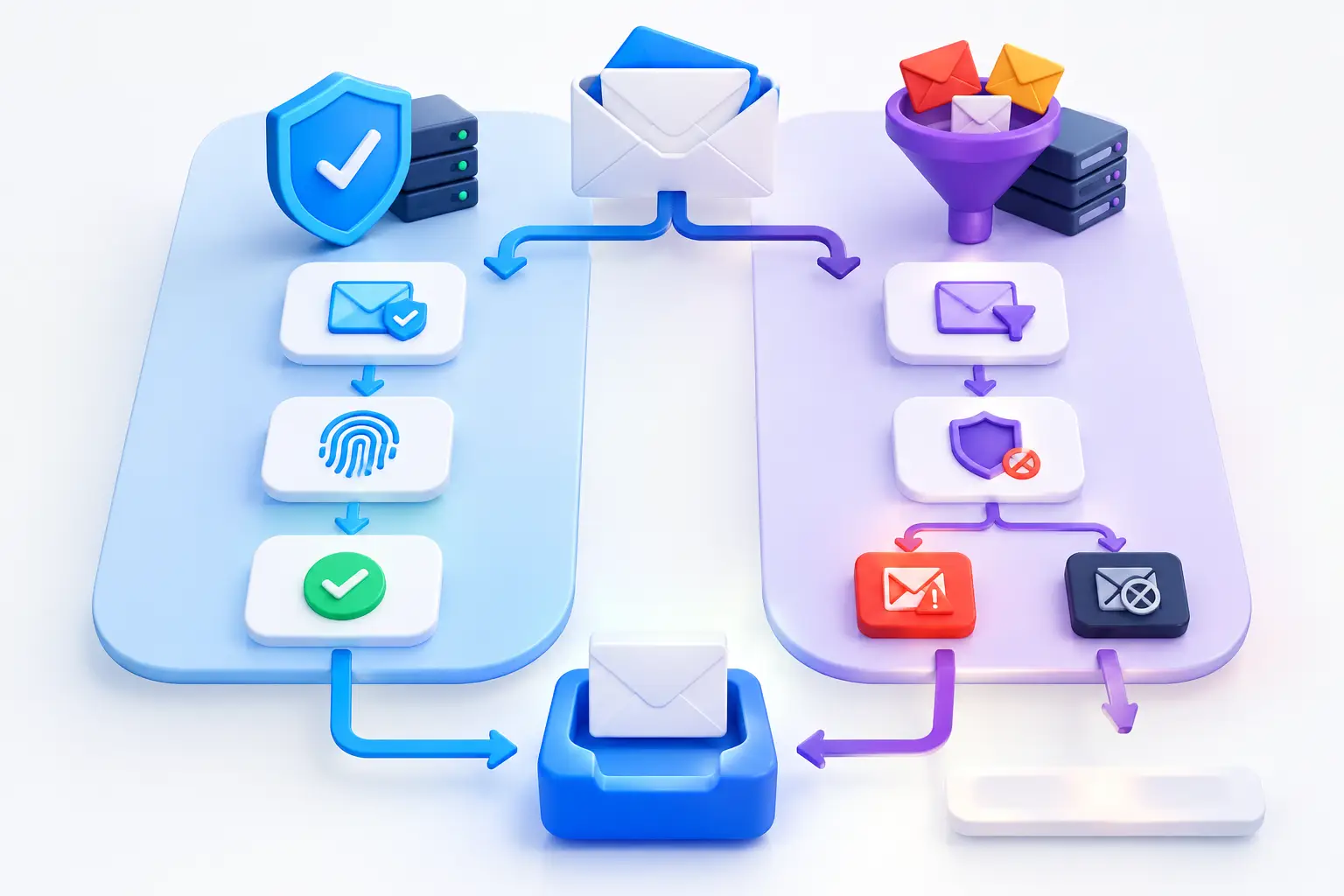
Email Authentication Versus Email Filtering
A fraudulent invoice can pass through a mailbox even when it looks polished, uses a familiar logo, and appears to come from a trusted supplier. That is why email authentication versus email filtering is not a choice between two competing tools. They address different points in the email threat path, and businesses need to understand both before deciding where to invest time and administrative effort.
For small and mid-sized organizations, email remains a primary channel for credential theft, business email compromise, malware delivery, and vendor impersonation. A defensible email security program verifies who is allowed to send using your domain, evaluates suspicious messages entering your environment, and provides ongoing visibility when controls fail or drift.
What Email Authentication Actually Does
Email authentication establishes whether a message is legitimately authorized to use a specific sending domain. Its central purpose is to reduce domain spoofing - the practice of sending mail that appears to come from your company, a partner, or a well-known brand when it does not.
The main controls are SPF, DKIM, and DMARC. SPF identifies the mail servers authorized to send on behalf of a domain. DKIM adds a cryptographic signature that receiving servers can validate. DMARC connects those signals to a published policy, instructing recipients how to handle messages that fail authentication and sending reporting data back to the domain owner.
These controls protect a domain's identity. If an attacker sends a phishing email claiming to be from billing@yourcompany.com but uses an unauthorized infrastructure, DMARC can help recipient mail systems identify that message as unauthenticated. With a properly enforced policy, those systems may quarantine or reject it.
Authentication also gives administrators evidence. DMARC reports can reveal legitimate services sending mail for your organization, unauthorized sources attempting to impersonate your domain, and configuration issues that may affect legitimate delivery. This information is especially valuable when marketing platforms, customer relationship management systems, help desk tools, and cloud applications all send mail under the same domain.
What Authentication Does Not Do
Email authentication does not determine whether a message is safe, truthful, or relevant. An attacker can use a newly registered domain that passes SPF, DKIM, and DMARC. They can compromise a legitimate mailbox and send authenticated phishing messages from it. They can also impersonate an executive using a lookalike domain that differs by one character.
Authentication cannot inspect an attachment for malware, identify a malicious link hidden behind a trusted service, or understand whether an urgent wire-transfer request breaks normal business practice. It confirms domain authorization, not business intent.
What Email Filtering Actually Does
Email filtering evaluates messages for indicators of spam, phishing, malware, fraud, and unwanted content. It is commonly delivered through a cloud email security gateway or built into a business email platform. Filtering uses multiple signals, including sender reputation, message headers, content patterns, links, attachments, behavioral indicators, and threat intelligence.
A capable filter can quarantine a message with a weaponized attachment, rewrite or block a suspicious URL, flag an external sender attempting to impersonate a company executive, and prevent common spam from reaching users. Some solutions also provide post-delivery remediation, removing malicious mail from inboxes after a threat is identified.
Filtering is the control employees experience directly. It reduces the volume of dangerous or distracting messages that reach inboxes and helps contain threats that use technically valid sending infrastructure. It is also where policy decisions matter: overly aggressive filtering can delay vendor communications, invoices, password resets, or customer requests.
Filtering Has Limits, Too
No filter can reliably understand every legitimate business relationship or every new social-engineering tactic. Attackers change language, rotate domains, exploit compromised accounts, and use file-sharing services that may be common in normal operations. A message can be benign from a technical perspective but fraudulent in context.
Filters also rely on correct configuration and active administration. Allow lists, forwarding rules, mail-flow settings, and quarantine policies can create blind spots when they are not reviewed. If staff routinely release suspicious messages because the quarantine process is unclear, the control loses much of its practical value.
Email Authentication Versus Email Filtering: The Key Difference
The simplest distinction is this: authentication helps receiving systems determine whether a sender is authorized to use a domain, while filtering determines whether a specific message appears risky or unwanted.
Authentication is primarily an identity and domain-protection control. Filtering is primarily a message-inspection and threat-prevention control. Both can influence delivery decisions, but they work from different evidence and protect against different failure modes.
Consider a supplier impersonation attempt. If the criminal spoofs your own domain, SPF, DKIM, and DMARC can help prevent the message from being accepted as legitimate. If the criminal uses a deceptive outside domain, such as a close variation of a supplier's name, filtering may identify the impersonation pattern, risky link, or suspicious language. If the attacker sends from a compromised supplier account, the message may authenticate correctly, making filtering, user verification procedures, and incident response even more significant.
This is why organizations should avoid treating a DMARC project as a replacement for email security filtering. The reverse is also true. A strong filter does not stop bad actors from abusing an unprotected domain to target customers, partners, or employees elsewhere.
Build a Layered Email Security Workflow
A practical program begins with visibility. Inventory every approved system that sends email using your domains, including cloud applications, marketing platforms, transactional email services, printers, and support tools. This prevents legitimate mail from being interrupted when authentication policies become stricter.
Next, configure SPF and DKIM accurately for each approved sender. Deploy DMARC in monitoring mode first, review reports, and resolve alignment failures. Moving immediately to a reject policy without understanding the sending environment can disrupt legitimate communications. Once authorized senders are confirmed, progress toward quarantine or reject enforcement based on the organization's risk tolerance and operational readiness.
Filtering should be configured in parallel, not later. Review impersonation protection, attachment handling, URL scanning, external sender labeling, spoof intelligence, and quarantine workflows. The right settings depend on the business. A law firm, healthcare provider, manufacturer, and online retailer may have different tolerance for delayed email, attachment restrictions, and release approvals.
Administrators should also establish a clear process for high-risk requests. Payment changes, payroll updates, credential requests, and sensitive document sharing should require verification through a separate channel. This control matters because a convincing email may pass both authentication and filtering.
Continuous Monitoring Turns Configuration Into Protection
Email security changes as the business changes. A new software provider may begin sending messages from an unapproved service. A marketing team may add a platform without involving IT. An employee may create an overly broad allow-list entry to solve a delivery problem. Attackers may begin targeting a newly visible executive or supplier relationship.
Continuous monitoring identifies these changes before they become persistent exposure. DMARC reporting should be reviewed for unknown senders and failed alignment. Mail security logs should be examined for impersonation attempts, unusual forwarding activity, repeated user-released messages, and campaigns that bypass initial controls. Findings should result in documented remediation, assigned ownership, and validation that the corrective action worked.
For organizations with limited internal security capacity, this operational discipline is often more valuable than simply purchasing another email security feature. FortifyNET's approach to monitored email oversight aligns email controls with the broader need for visibility, prioritized remediation, and documented governance.
Common Decisions That Require Judgment
A strict DMARC reject policy is a strong objective, but timing matters. Organizations with complex legacy applications or decentralized marketing activity may need a measured rollout while they identify every legitimate sender. The risk of temporary monitoring must be weighed against the risk of blocking customer communications.
Similarly, aggressive filtering reduces exposure but can create operational friction. Finance teams may need invoices with attachments. Sales teams may receive email from new prospects. Support teams may work with unfamiliar senders every day. Rather than weakening protections across the board, apply targeted exceptions, approval workflows, and regular reviews.
Training also has a role, but it should not be the primary defense. Employees need to recognize suspicious requests and know how to report them. They should not be expected to compensate for missing authentication, weak filtering, or unclear business processes.
Email trust is built through layers: verified domain identity, intelligent message inspection, disciplined administration, and repeatable verification for sensitive requests. When those layers are monitored and improved over time, the organization gains more than cleaner inboxes. It gains a more controlled and accountable security posture.